Vidalytics is the best platform in this set for conversion-focused video. Its verified toolkit includes Smart Autoplay, Play Gates, timed calls to action, video heatmaps, segments, and conversion tracking. Those controls make it unusually well suited to VSLs and webinar funnels; they are less important for a simple portfolio or public channel.
Who is Vidalytics for?
Vidalytics is for direct-response marketers, course sellers, agencies, and funnel teams that want to connect viewer behavior with revenue actions. The platform helps answer where attention falls, when people convert, and which version performs better, not merely how many plays a video received.
One caveat applies to the agency case. The help center states that “The Users feature is not currently available for Agency accounts.” An agency that needs separate logins for its own staff or its clients should confirm the account type and what it includes with the vendor before signing up.
That focus preserves the useful core of this site’s archived 2022 homepage. Hosting choice can affect conversion because player distractions, autoplay behavior, load experience, gate timing, and measurement all shape the journey around the content. The old article overstated some conclusions; this review keeps the durable framework without carrying over unsupported conversion claims. If you sign up for Vidalytics through the link on this page, Video Hosting Reviews may earn a commission. It costs you nothing extra and has no bearing on the verdict.
Pricing
Vidalytics lists a free plan and three self-serve paid tiers. The lower figure below is the annual-equivalent amount shown on the page; the higher figure is month-to-month.
| Tier | Month-to-month | Annual-equivalent price shown |
|---|---|---|
| Free | $0 | $0 |
| Starter | $24/month | $19/month |
| Pro | $79/month | $63/month |
| Premium | $149/month | $119/month |
| Enterprise | Custom quote | Custom quote |
Pricing checked: September 2026. Included bandwidth and overage rates vary by tier.
Key features
Smart Autoplay adapts the opening experience when browsers block autoplay with sound. Play Gates can collect information around playback, while calls to action can be tied to moments in the video. These tools reduce the gap between watching and acting, but they still require responsible testing; a feature is not a guaranteed conversion lift.
The analytics layer is the stronger reason to buy. Heatmaps make rewatching and drop-off visible, segments organize different viewer groups, and conversion tracking connects actions to playback behavior. Compare View supports side-by-side analysis. Together, those tools turn a video from a reporting blind spot into something a marketing team can iterate.
What is the Vidalytics player experience like?
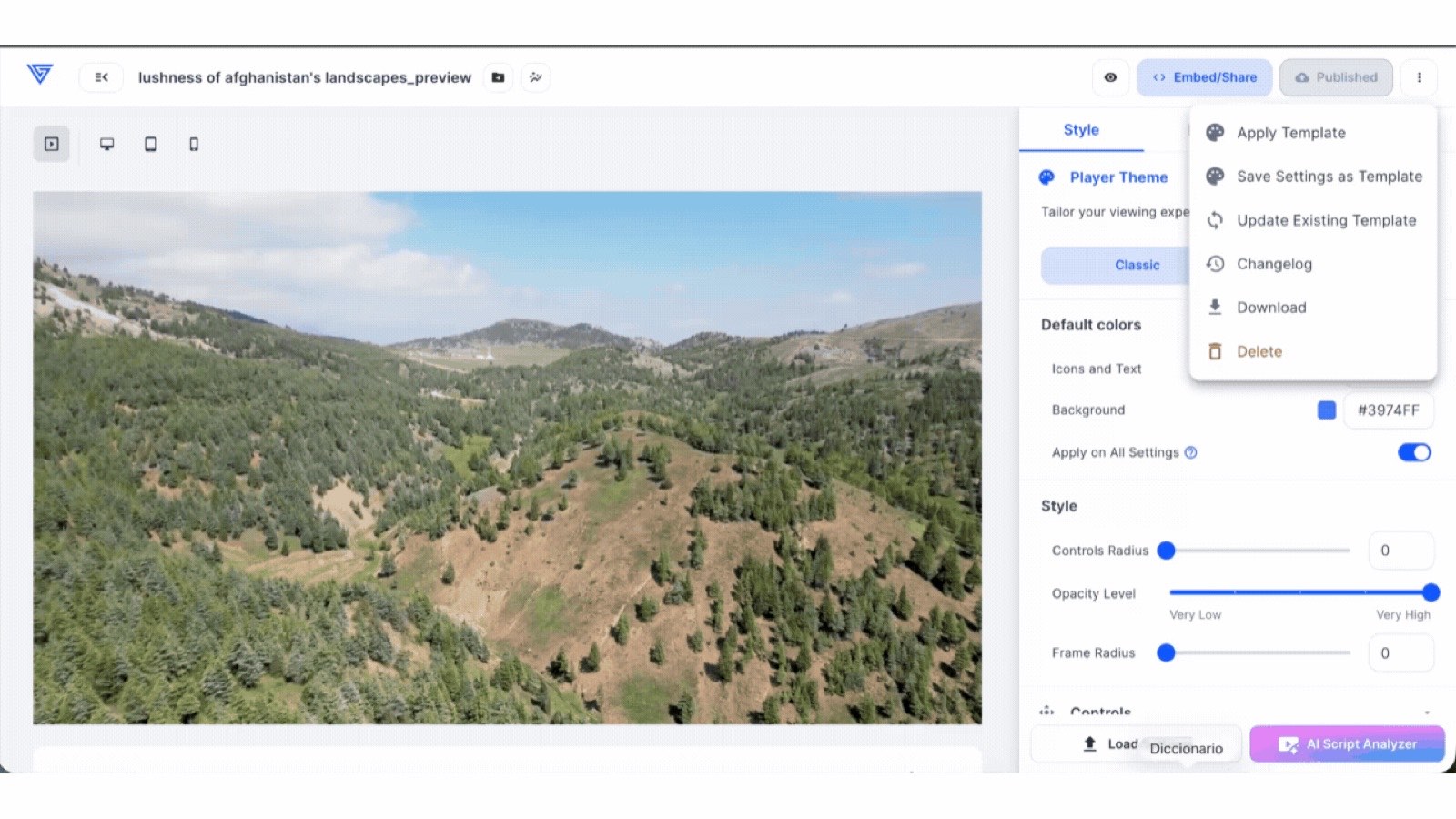
The Vidalytics player is designed around controlled marketing journeys rather than public discovery. Based on the platform’s published capabilities, the main advantage is not simply removing third-party ads. It is the ability to coordinate autoplay behavior, playback controls, gates, and calls to action with the message inside the video. That makes the player relevant to a landing page where the next action matters as much as the view.
Smart Autoplay is the clearest example. Modern browsers commonly restrict sound-on autoplay, so Vidalytics documents a muted opening experience with click-to-unmute behavior. That does not guarantee a higher conversion rate, and this review does not claim one. It gives a funnel team a defined way to handle a browser constraint instead of leaving the opening entirely to default player behavior.
The published feature set also includes options for long-form presentation, return viewers, interactive paths, and calls to action tied to video timing. Those controls can be useful for a VSL or webinar replay, but restraint matters. Hiding too many controls or placing gates aggressively can frustrate viewers. The right setup depends on the promise made before playback, the audience’s expectations, and whether accessibility remains intact.
Vidalytics’s public changelog documents Picture-in-Picture mode and Smart Vid templates in July 2026. Picture-in-Picture gives a compatible viewer a way to keep the video visible while using another page or application, while templates can shorten setup for supported marketing-video formats. These are vendor-documented capabilities, not evidence that one configuration improves every page. The same changelog records settings experiments with a winner recommender across March through May 2026, giving teams a documented way to compare player-setting variants before selecting a declared winner.
How good are Vidalytics analytics in 2026?
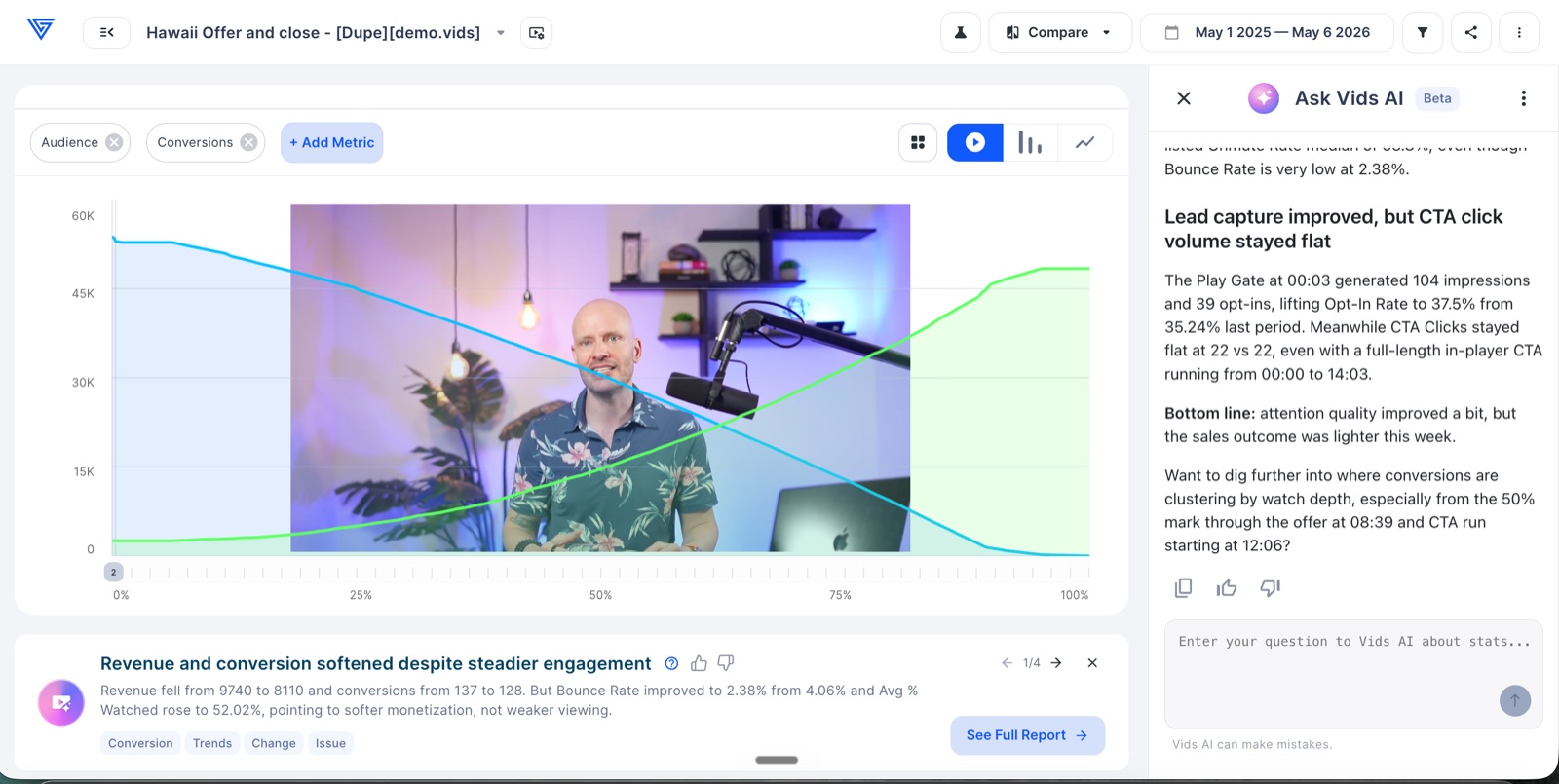
Vidalytics is the strongest analytics fit in this comparison for direct-response video because its published reporting model connects attention with conversion. Heatmaps show where viewers watch, skip, or revisit. Timeline and engagement views help identify the part of a presentation where attention changes. Segments let a team separate audiences or behaviors instead of averaging every viewer into one line.
Conversion tracking is the differentiator. A basic host can report plays and completion; Vidalytics documents tools intended to relate conversion events to points in the video. That supports questions such as whether converters watched a particular section or whether a version produces a different outcome. Compare View adds side-by-side analysis for two videos, which is useful when the team already has a disciplined hypothesis and enough traffic to interpret differences responsibly.
The caution is attribution. A video event does not prove that the video alone caused a purchase, and a heatmap is not a strategy by itself. Traffic source, page copy, offer, device, and returning visitors can all affect results. Treat the platform as a richer measurement layer, then connect it to a broader analytics process. Its APIs and advanced data options become more relevant when business intelligence or a warehouse is the source of truth.
The vendor’s public changelog documents AI performance insights in June 2026. The published analytics interface can surface observations beside engagement and conversion reporting, including references to gate, opt-in, and call-to-action behavior. Treat those generated observations as prompts for analysis rather than conclusions: the team still needs to inspect the underlying metric, campaign context, and downstream result. The documented settings experiments and winner recommender also connect player configuration with comparative reporting, but a declared winner remains specific to the configured experiment and its traffic.
How does Vidalytics handle security and privacy?
Vidalytics should be evaluated as a marketing host, not as the security-first winner. The platform publishes controls for embedding and account use, but buyers whose business depends on DRM, forensic watermarking, or stringent anti-piracy protection should compare VdoCipher. A distraction-free player and an unlisted embed are not the same thing as a formal content-protection system.
Privacy also extends beyond who can open a video. Conversion tracking, viewer identification, CRM tagging, and behavioral segments may involve personal or pseudonymous data depending on implementation. A team should map what is collected, what consent applies, which systems receive it, and how long it is retained. The presence of an integration does not replace that governance work.
For ordinary funnel use, the practical checklist is straightforward: restrict embeds where appropriate, use least-privilege account access, document tracking in the site’s privacy notices, and avoid collecting more viewer data than the campaign needs. If the video contains paid intellectual property, regulated information, or confidential training, ask Vidalytics directly about the required controls before treating a marketing-oriented feature as a security guarantee.
Which Vidalytics integrations fit a marketing workflow?
Vidalytics fits best when playback data can reach the systems that run the customer journey. Its published plan matrix includes standard and advanced integrations, API access, and data capabilities that vary by tier. The intended workflow is clear: publish the video on a controlled page, connect engagement or conversion events to marketing tools, and use those signals to improve follow-up and reporting.
For a smaller team, the first integration question should be concrete. Do you need a timed button on the page, an opt-in gate, a tag in an email platform, or a conversion event in analytics? Choosing one required handoff prevents a long integrations list from driving the purchase. Confirm that the chosen plan supports the exact destination and event rather than assuming all integrations are available on Starter.
Larger teams may care about APIs, bulk statistics, near-real-time viewer activity, and data pipelines. Those capabilities make sense when the organization already has analysts and a defined identity model. They add complexity for a business that only needs a branded embed and basic engagement. In that simpler case, Wistia may provide the more balanced workflow even though Vidalytics has the higher overall score.
For teams considering a move, Vidalytics’s public changelog also documents direct import from Wistia, Vimeo, Google Drive, and Dropbox. That is a genuine migration path for supported source assets, though buyers should still confirm how captions, thumbnails, analytics history, privacy settings, and existing embeds are handled before treating media import as a complete migration.
Which Vidalytics pricing tier fits whom?
The Free plan is the sensible place to confirm player fit, but the page states that its metrics are restricted. Starter is aimed at a marketer who needs an unbranded player and a small active library. Pro is the more plausible evaluation point for experienced video marketers because the vendor positions it around advanced conversion-driving features and integrations. Premium expands included capacity and features for teams running more campaigns. Enterprise is the procurement path for scale, advanced customization, and larger operational needs.
Do not choose solely by the number of stored videos. Estimate monthly bandwidth, the number of active funnel assets, required integrations, analytics depth, and overage exposure. The page distinguishes monthly and annual bandwidth treatment and shows extra-bandwidth rates, so a high-traffic launch can change the effective price materially.
Annual pricing displays a lower monthly equivalent: Starter $19, Pro $63, and Premium $119. An annual commitment is only a saving if the workflow remains useful. A short validation period should prove that the team can act on the analytics, not merely that the player can load. Month-to-month pricing preserves flexibility while that process is still being defined.
What are the main Vidalytics limitations?
The first limitation is specialization. Vidalytics can be excessive for product tutorials, an internal knowledge library, a creative portfolio, or public education. Those use cases may value collaboration, simple organization, live events, or discovery more than conversion controls. Paying for a specialized analytics layer without a clear optimization process creates tool cost without decision value.
The second limitation is that advanced settings create responsibility. Autoplay, gates, hidden controls, and timed calls to action can support a coherent journey, but they can also make the experience feel restrictive. Accessibility, user expectation, mobile behavior, and page speed still need attention. Published capabilities describe what can be configured, not the quality of every configuration.
Finally, traffic changes cost. Included bandwidth and overage rates differ by plan. A team should model launches, evergreen traffic, and video bitrate before assuming the subscription price is the whole bill. Developers also need to confirm API limits and data access at the intended tier.
Is Vidalytics worth it in 2026?
Yes. Vidalytics is worth it for a team whose VSLs, webinar replays, or funnel videos directly influence revenue and whose staff will use conversion data to make decisions. It is our highest-scoring platform at 9.1/10. Wistia is still the better all-around business choice when the library spans brand, product, education, and marketing rather than direct response.
The decision should be based on the job, not the rank alone. If success means learning where a sales presentation loses attention and connecting playback with an action, Vidalytics has the strongest published fit. If success means managing a broad video program with a refined player and approachable business workflow, start with Wistia.
How does Vidalytics compare with other video hosts?
Against Wistia, Vidalytics wins overall and for conversion-focused VSLs; Wistia wins the all-around business-video category. See the data-driven Vidalytics vs Wistia comparison for scores, free-tier status, pricing, and category winners. The best Vidalytics alternatives guide ranks every other reviewed option by editorial score.
Vimeo is more compelling for creative collaboration and hosted events. Bunny Stream is better for a developer-led product that values usage-based infrastructure. VdoCipher is stronger for protected paid content, while Spotlightr brings course engagement features. YouTube remains the public-discovery baseline. Those are category distinctions, not reversals of the overall score order.
Who should not choose Vidalytics?
Teams should not choose Vidalytics merely because it has the highest editorial score. A score summarizes several dimensions; it does not make a conversion specialist the best fit for a public channel, creative review process, protected course, or developer-owned product. YouTube, Vimeo, VdoCipher, and Bunny Stream lead those respective categories more clearly.
A company with a broad library and no dedicated optimization owner may also prefer Wistia. Vidalytics creates value when someone can define conversion events, interpret engagement, propose a change, and evaluate the outcome. Without that loop, advanced reports become another dashboard. The organization should identify the person and decision process before paying for Pro or Premium.
Finally, teams that require formal DRM, tightly governed confidential playback, or contract-specific media protection should not infer those controls from a marketing player. Evaluate VdoCipher or an enterprise security process. Vidalytics remains the strongest published fit for direct-response video, but specialist strength is useful only when the specialist job exists.
What we like / What we don’t
What we like
- +Smart Autoplay, Play Gates, and timed calls to action
- +Heatmaps, segments, and conversion tracking for optimization
- +Free plan plus transparent self-serve paid tiers
- +Return-viewer and video-behavior tools suit long-form VSLs
What we don’t
- −More conversion machinery than a simple brand video needs
- −Bandwidth overages can affect the effective cost
- −No built-in public discovery audience
Alternatives
Vidalytics FAQ
What is Vidalytics best for?
Vidalytics is best for video sales letters, webinar replays, funnels, and other marketing videos where viewer behavior and conversion timing matter.
Does Vidalytics have a free plan?
Yes. Its live pricing page lists a Free Forever plan with reduced metrics and limited included videos.
What is Smart Autoplay?
Smart Autoplay is Vidalytics’ approach to muted autoplay and click-to-unmute behavior, designed for browsers that restrict sound-on autoplay.
Can Vidalytics track conversions?
Yes. Vidalytics lists conversion tracking, heatmaps, viewer segments, and side-by-side comparison tools among its analytics capabilities.
Is Vidalytics worth it in 2026?
Yes for teams whose VSLs and funnel videos directly influence revenue. General business-video teams that do not need conversion controls may get better category fit from Wistia.
How much does Vidalytics cost?
The live page lists Free, Starter at $24 month-to-month, Pro at $79, Premium at $149, and custom Enterprise pricing, with lower annual-equivalent figures displayed.
Does Vidalytics support calls to action and lead capture?
Yes. Its published capabilities include timed calls to action and Play Gates intended to connect playback with a next step.
Final verdict
Vidalytics is our top choice for direct-response video because its player controls and analytics are designed to answer the only question a VSL team ultimately cares about: what makes more viewers act?
Try Vidalytics for free ↗